







File Import Introduction
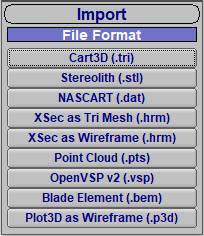
OpenVSP will import a variety of file formats including existing OpenVSP 3 models, triangulations/meshes, rectilinear wireframes, OpenVSP v2 models, blade element models, and point clouds. Each of these file types will have their own processes and assumptions when bringing geometry into OpenVSP which will be discussed in the following tutorials. Imported geometries will be placed as a child of any selected component in the model tree. To place an imported geometry at the highest or “vehicle” level, deselect all components prior to starting the import operation.
Importing files into your model is a great way to start modeling external geometries in OpenVSP. Only some of these options directly create OpenVSP components for you, however, so there will be some manual work to create something new. Don't be discouraged. It takes very little time to recreate something in OpenVSP and it's almost always worth it.

Inserting VSP3 Models
Existing OpenVSP models may be inserted into your model as a child of any component or at the Vehicle level by choosing “Insert…” from the File menu. The inserted VSP3 model will not only import the geometry but will also bring along any links, materials, airfoils, attachment, etc. that were defined in that model, even in the case of duplicate model imports.
Inserting VSP3 models is like pulling parts or assemblies from inventory and recombining them in new ways. If you often find yourself creating the same part again and again, save that geometry to be inserted later rather than starting from scratch. OpenVSP has been designed to detect and avoid any potential link or attachment conflicts so you don't have to worry about overwriting your hard work.
Importing Meshes
Meshes such as TRI or STL files may be imported into your OpenVSP model under the Import… menu. When working with meshes, both those created within OpenVSP and imported from elsewhere, if the OpenVSP model is saved with a MeshGeom present, the entire mesh content is appended to the VSP3 file which can quickly lead to excessively large file sizes. OpenVSP is also capable of importing and operating on open or non-watertight meshes.
When creating meshes outside of OpenVSP with the intent of importing into your model, you may sometimes find that surface normals are flipped or that there are gaps in the mesh. In some cases, the mesh will fail to import altogether. In these cases, you may try to export the mesh in ASCII (or non-binary) format which has been demonstrated to be a more reliable when importing to OpenVSP.
For more information related to OpenVSP Meshes, go to the OpenVSP Meshes and Point Clouds content.
Meshes often serve as the reference for rebuilding geometries in OpenVSP. These meshes can be used as visual guides or converted to points which may be selected as targets for Fit Model. Meshes may also be included in some OpenVSP analyses but it is your responsibility to ensure that the mesh is of sufficient quality for that analysis.
Importing Wireframes
Wireframes of Hermite (HRM) or Plot3D (P3D) format may be imported to OpenVSP models from the Import… menu. Hermite files have the option of importing as triangulated meshes or as wireframes. Note that some Hermite components may import with the reflected surface normals inverted which will be easily identified by shading the surface, resulting in a dark or shadowed effect.
Wireframes function differently than Meshes in OpenVSP because wireframes are structured and rectilinear. Importing these components is only the beginning. Wireframes may be directly manipulated in OpenVSP by choosing custom start/end locations and coarsening the surfaces.
Importing OpenVSP Version 2 Models
Heritage OpenVSP v2 models (with VSP file extension rather than VSP3) may be imported from the Import… menu. In most cases, the translation from OpenVSP v2 components to their OpenVSP 3 counterparts is very straightforward and has been automated as much as possible. For example, version 2 parameters defining a Wing will be directly applied to the matching parameters in version 3. A similar process occurs for fuselage cross-sections and skinning parameters. However, some VSP2 parameters or methods do not exist in VSP3 models or components and may require some manual iteration to match the design exactly. In such cases, it is recommended that the VSP2 model is imported along with a mesh (TRI, STL, etc.) from OpenVSP v2 to provide a guide for any required corrections.
It has been many years since OpenVSP version 2 was replaced yet there are still some models out there that you may want to import. Almost all components will directly transfer but be very diligent in watching for small errors.
Importing Point Clouds
Point clouds may be imported into an OpenVSP model from the Import… menu. The point cloud (PTS) format is a very simple X Y Z triad with each row corresponding to a new point, which makes these files very easy to read and write. Once imported, the point cloud may be used as a visual target for manual modeling or as Fit Model targets.
PTS FormatX1 Y1 Z1
X2 Y2 Z2
X3 Y3 Z3
...
XN YN ZN
For more information related to OpenVSP point clouds, go to the OpenVSP Meshes and Point Clouds content.
Rather than importing a mesh and then converting to points as targets, you can bring a list of points directly into your OpenVSP model. Point cloud use examples include incompatible airfoil coordinates for AF/DAT, surface scan results, component origin targets, or function-dependent profiles for custom surfaces.
Importing Blade Element Models
Blade element momentum (BEM) models may be imported into OpenVSP as Prop components in which each of the BEM stations are set as Prop blade control points. Because the Prop component is perhaps the most complex geometry in OpenVSP, it can take quite a while to update models with excessive numbers of control points when in Blades mode. This tends to become particularly cumbersome when imported BEM models have many stations, say roughly 10 to 20 or more. A way to alleviate this is to switch the Prop to Disk mode, which doesn’t require a visual update to loft the blade with each parameter change. Users may also wish to convert the blade control curves to Approximate Cubic Bezier to reduce the number of points. This can be quickly accomplished for all blade curves by clicking “Approximate All” under the Blade tab.
For more information about working with Prop components, refer to the Propellers content.
Blade element models often have many stations defining the blade profile which can lead to very slow OpenVSP Props. Before you Approximate All to reduce the order of the control curves, make a copy of the imported Prop so you can compare the original geometry to the approximated geometry. If nothing else, the original can serve as a Fit Model target for refining the new Prop.